Write the check.
Keep the behavior.
Give your workflow fixture inputs and an explicit expectation. Run the same output check inside n8n, in Docker or in CI.
Want your first test built for you? Email for a free first test.
Start with an export.
In n8n, pin the input and the result you want to check after a known-good manual run, then export the workflow. Select those same nodes below, or enter fixture JSON.
Successful run, wrong data? Choose a check by symptom.
File contents stay in this browser tab. Free and MIT-licensed.
Or paste an exported workflow
Case contract
Recheck a change: load the updated workflow above, then your saved case here. Its fixture and expectation stay fixed; download a new test or run pack for the updated code.
This node is replaced by the input items below. Its downstream nodes execute.
Choose the result node you pinned. To check a transformation before Slack or another integration, select that transformation here and enable Stop after selected output.
Run the selected output node, then stop this branch before its downstream integrations. Other branches reachable from the fixture still run; review the selected slice below. For loops, choose a node after the completed output.
Compare every JSON field in execution order.
Start at the n8n item: json.id or json.customer.id. Values retain execution order. Missing fields fail the check.
JSON object array, e.g. [{"id": 42}]. At least one item.
Exact JSON items in run order. An empty array checks for zero items. Pins prefill branch 0.
HTTP mock contracts
For each HTTP Request node, supply the mock response status/body, local route, and exact expected request count. Add expect.bodies to check outgoing payloads. Sequential responses exercise retries. routes[].path matches the final path plus query string (for example /items?id=42); n8n’s exported query-parameter settings still apply.
From download to a real result.
- Start Docker, then Download local run pack above.
- Unzip it. Open a terminal in the extracted folder.
- Run
sh run.sh. Read the checks in your terminal and the JSON/JUnit files inresults/.
sh run.sh
The first run downloads the pinned runner and chosen n8n image. Later runs reuse the local build cache. The workflow and fixtures remain on your computer; the check runs in a loopback-only Docker container.
Requirements: Docker running with Linux containers, and a shell on Linux, macOS, or WSL2. Exported JSON and the editable case are included in the pack.
The sample adds synthetic pinned snapshots to our silent-filter workflow. Reference execution: the fixed export preserves eight useful rows; the broken export loses them while n8n completes successfully. Try the same downloaded case with both exports.
Keep the same check in CI.
- Place
workflow.jsonandcase.jsonat the root of a GitHub repository. - Download the CI file above and save it as
.github/workflows/n8n-check.yml. - Commit. Open Actions → n8n release check for the summary and artifacts.
GitHub Actions usage follows your account’s plan. You can also use the CLI with your existing n8n installation.
Case builder scope: JSON item fixtures, one assertion node/branch, and HTTP mocks. Self-contained slices with credential-free downstream nodes use the existing runner contract.
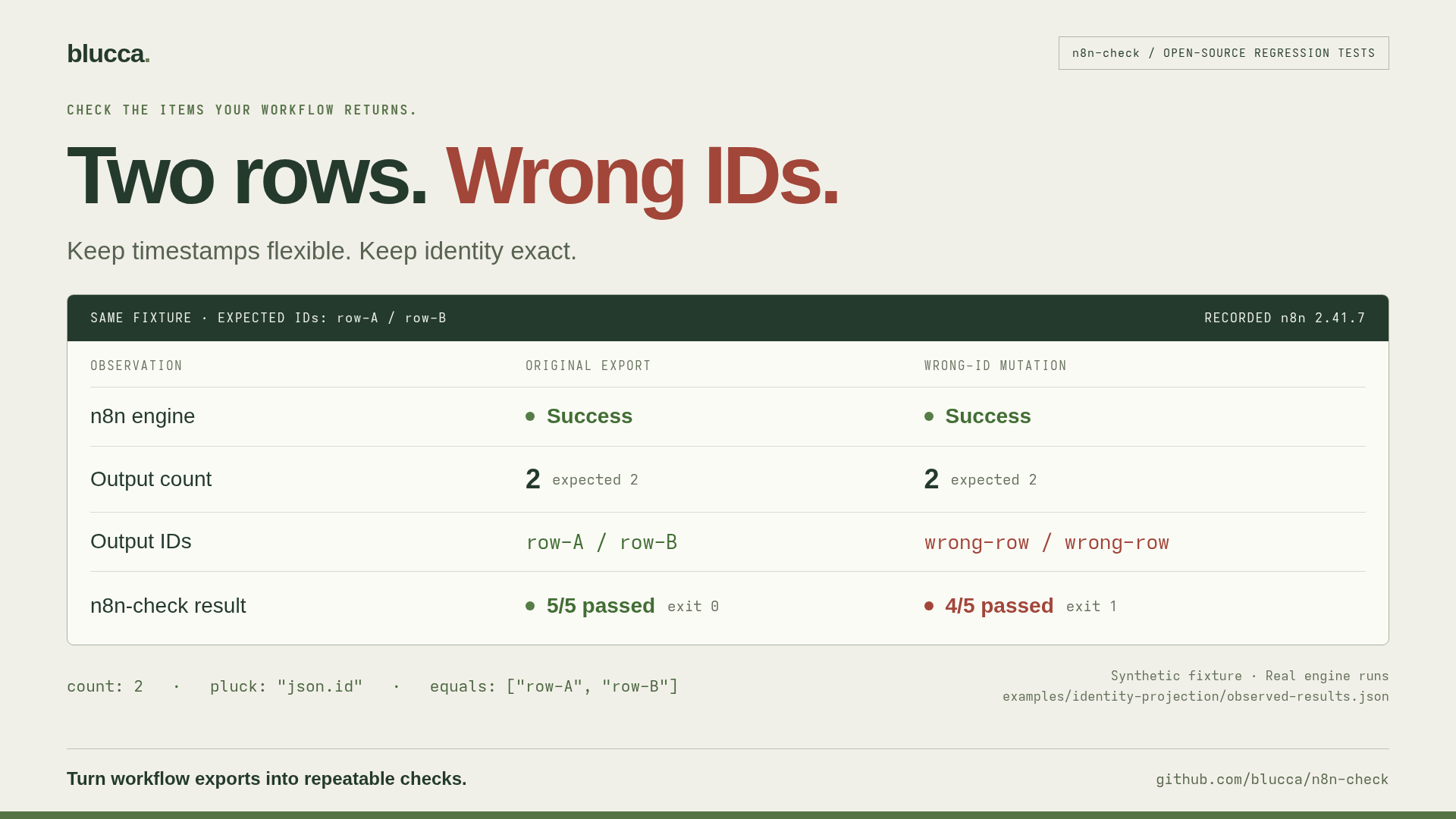
Two successful runs.
One failed identity check.
Download both exports and the same test case. Run the original, then the deliberately changed IDs. Each keeps its own JSON/JUnit reports.
Download comparison (.zip)sh fixed/run.sh # 5/5 · exit 0 sh wrong-id/run.sh # 4/5 · expected exit 1
Extract into a new folder. Requires Docker + a shell on Linux, macOS, or WSL2. First run downloads the runtime. Source & recorded results
Keep the same case
in your development loop.
Use the CLI with your installed n8n runtime, or add the GitHub Action to a repository. Both produce JSON and JUnit reports from the workflow and case you reviewed.
CLI: Node.js 24+ and an installed n8n runtime. The local ZIP uses Docker; GitHub Actions runs in your account.
npm install --global @blucca/n8n-check@0.1.8
n8n-check --help